
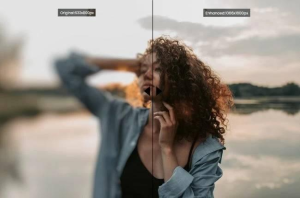
In the digital age, photographs are not just memories but an integral part of communication, branding, and storytelling. However, capturing the perfect shot is not always possible, and issues like blurring can detract from an image’s impact. Fortunately, advancements in artificial intelligence (AI) have paved the way for sophisticated solutions that can unblur pictures with remarkable efficiency. This comprehensive guide explores how to unblur pictures online for free using AI, offering a step-by-step approach and tips to achieve the best results.
Understanding Image Blur
Before diving into the solutions, it’s crucial to understand the types of blur you might encounter:
- Motion Blur: This occurs when the subject moves during the capture process, resulting in a streaked or smeared appearance.
- Focus Blur: This happens if the camera focuses incorrectly, making the subject or parts of the image look soft and unclear.
- Camera Shake: Similar to motion blur, but caused by the movement of the camera itself, often noticeable in low light conditions when the shutter speed is slow.
Identifying the type of blur is essential as it influences the correction technique and the effectiveness of AI tools.
How AI Enhances Blurry Images
AI-based tools enhance images through complex algorithms and machine learning models that have been trained on vast datasets of images. These models learn to recognize patterns of blur and apply corrections that mimic the adjustments a professional editor might make. Here’s how AI generally tackles blurry images:
- Edge Enhancement: AI detects the edges within an image and sharpens them without increasing noise.
- Deblurring: AI models predict the clear version of a blurry image by understanding how sharp lines and color transitions should look.
- Noise Reduction: AI often incorporates noise reduction techniques since sharpening images can introduce noise.
Step-by-Step Guide to Unblurring Pictures Using AI
Step 1: Choose the Right Platform
While specific tool names are excluded from this discussion, numerous free online platforms offer AI-based image enhancement. Look for services that specify they use AI technologies and check user reviews or ratings to gauge effectiveness.
Step 2: Upload Your Image
Once you select a platform, the next step is to upload the blurry image. Most platforms will have an upload button clearly visible on their main page. Ensure your image complies with the site’s format and size requirements.
Step 3: Apply AI Deblurring
After uploading, the platform will typically present you with options for correcting the image. Select the AI deblur option. Some platforms allow adjustments to the intensity of the correction, giving you control over how much the image is sharpened or enhanced.
Step 4: Preview and Adjust
Post-processing, preview the image. Some tools offer before-and-after views to compare the original and corrected images side by side. If available, tweak the settings until you achieve the desired clarity.
Step 5: Download the Enhanced Image
Once satisfied with the result, download the enhanced image. Check if the platform supports downloading in the original resolution or if it compresses the image, as this might affect the quality.
Tips for Best Results
- Use High-Quality Originals: The better the quality of the original image, the more effectively AI can enhance it.
- Adjust Expectations: AI is powerful, but not magic. Some images, especially those with severe blur, may not be fully recoverable.
- Protect Privacy: Be cautious about uploading sensitive or personal images to online platforms.
- Regular Updates: AI technologies evolve rapidly. Regularly check for updates or new tools that might offer improved results.
Ethical Considerations and Privacy
When using online tools, consider the privacy and security of your data. Free tools might use your data for training their models or share it with third parties. Always review the privacy policy of the platform before uploading images.
Conclusion
Unblurring pictures using AI is a game-changer in digital photography and image management. By leveraging free online AI tools, even amateurs can achieve professional-like clarity in their photos. While the technology has its limitations and requires careful consideration of privacy issues, the potential it offers is undeniable. As AI continues to advance, we can expect even more powerful tools to emerge, making image enhancement more accessible and effective.
