
VMware ESXi is a hypervisor that enables the creation and management of virtual machines. It’s a cornerstone for many enterprises, providing efficient resource management and high availability. However, like any IT infrastructure, ESXi environments are susceptible to data loss, system failures, and cyber threats. This makes implementing a reliable backup solution not just a best practice, but a necessity.
Why Backup is Essential for ESXi VMs
VMware ESXi can host multiple VMs, each running different applications and services. This consolidation simplifies management and enhances resource utilization but also increases the risk profile. Any disruption—whether hardware failure, software malfunction, or a malicious attack—can impact multiple critical services simultaneously.
Regular backups for VMware ESXi have the benefits such as:
- Ensure that your data remains intact and recoverable, protecting against accidental deletions, corruption, and ransomware attacks.
- Enable swift restoration of services, minimizing downtime and operational impact in the event of catastrophic failure.
- Facilitate seamless business operations by ensuring that critical applications and services can be quickly restored after an interruption.
Powerful & Leading ESXi VM Backups
AOMEI Cyber Backup stands out as a powerful and comprehensive tool designed for VMware ESXi backup. Tailored to meet the diverse needs of businesses, AOMEI Cyber Backup provides a robust set of features that streamline the backup and recovery process, making it suitable for businesses of all sizes.
Why AOMEI Cyber Backup?
- Incremental and differential backups saving time and storage space.
- Automation reduces the risk of human error.
- Easily scale to accommodate additional VMs and increased data volumes.
- Centralized management console that allows you to manage and monitor all your backup tasks from a single interface.
- An intuitive and easy-to-use interface for configuring and managing backups.
By choosing AOMEI Cyber Backup, you can minimize downtime, enhance business continuity, and focus on what matters most—growing your business.
How to Create a Centralized ESXI VM Backup
- Install and download AOMEI Cyber Backup first.
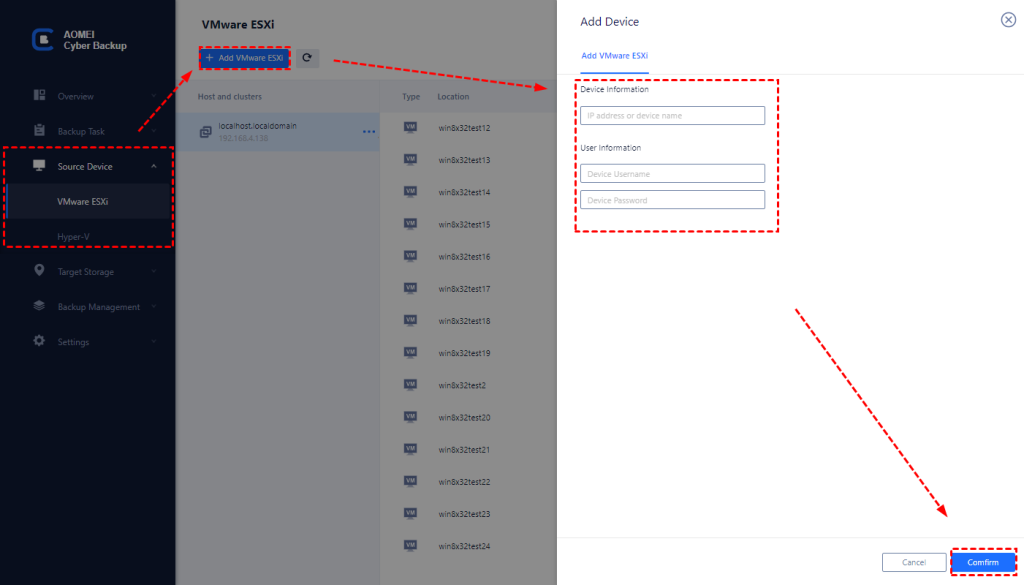
- Go to “Source Device” in the left-hand menu and select “Add VMware ESXi”. You don’t have to install agents on each computer. Enter the IP address, username, and password of your ESXi host. Click “Confirm” to add the host to AOMEI Cyber Backup.
- Create a Backup Task
- Navigate to the “Backup” section and click “Create New Task”.
- Name your backup task for easy identification.
- Select the VMs you wish to back up from the list of available VMs on your ESXi host.
- Choose your backup destination. This could be a local drive, a network share, or a cloud storage service.
- Configure Backup Settings
- Schedule: Set up a backup schedule to automate the backup process. Options include daily, weekly, or monthly backups.
- Backup Method: Choose between full, incremental, or differential backups.
- Retention Policy: Define how long backups should be kept before being deleted to manage storage space effectively.
- Review the settings and start the backup.
Review your backup settings to ensure everything is configured correctly. Then click “Start Backup” to begin the backup process.
- Restoring a VMware virtual machine from a backup is also easy, as shown below:
- Open AOMEI Cyber Backup and go to the “History” section.
- Click on the backup and choose “Restore“.
- Choose the destination for the restore. This can be the original or a new destination.
- Click “Start Restore” to initiate the restoration process.
In addition to backing up VMware ESXi virtual machines, it also supports Hyper-V VM Backup, MSSQL backup and more. By investing in AOMEI Cyber Backup, you can easily protect your VMware environment and secure your data from emerging threats.
Conclusion
Virtual machines from data loss and maintain business continuity are critical to the success of your operations. Implementing a strategic and efficient ESXi backup plan is not just a technical necessity but a business imperative. AOMEI Cyber Backup is the ideal solution for safeguarding your VMware ESXi environment. With AOMEI Cyber Backup, you can minimize downtime and enhance business continuity.
